for Lunch Money users

Money left over —
where should it go?

Takiflow reads your Lunch Money and answers with a plan: a month-end waterfall that routes every spare dollar — emergency floor, debts, investing, savings goals — in the order you choose.

Start free free to use · Pro adds the AI analyst, $5/mo · first month of Pro included
the plandrawn as it executes
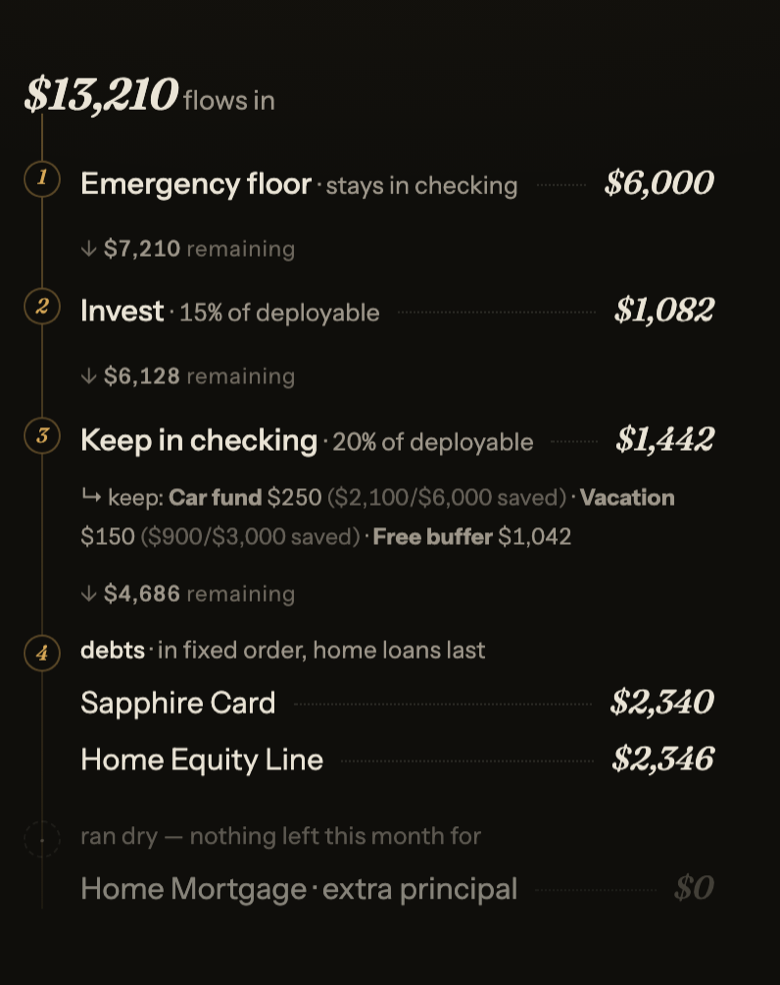
The allocation waterfall: $13,210 flows in — emergency floor, invest, keep in checking, then debts in order, with a running remainder.

One pool. Ordered drops.

At month-end your cash flows in at the top and the plan executes downward: the emergency floor stays put, debts get paid in the order your strategy dictates, investing and savings goals take their share — and you watch the remainder drain, step by step, to zero.

  • 1Buckets that get nothing stay visible — paused by strategy, never hidden.
  • 2Savings goals drip inside your keep, with progress toward each target.
  • 3Contractual minimums are paid first, before anything else moves.
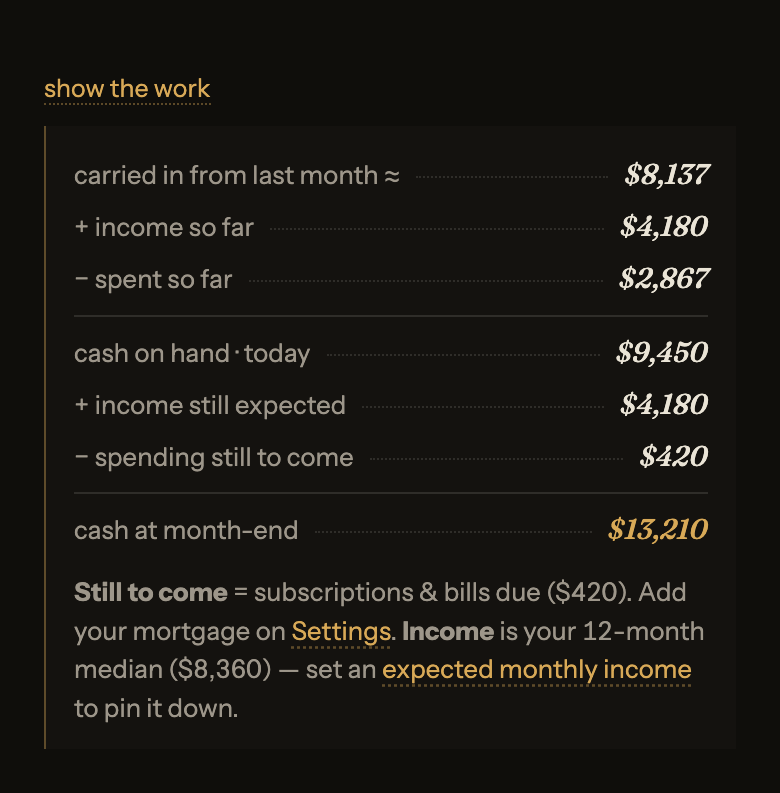
show the workevery number is a checkable claim
The 'show the work' panel: carried in, income, spent from checking, cash on hand today, income still expected, bills due, cash at month-end.

No number without a derivation.

Tap any figure and the ledger opens: what you carried in, what arrived, what actually left checking, what's still due — summing exactly to the number on screen. Your card is handled in exactly one place: the plan settles it at month-end, so nothing is ever counted twice.

The same numbers always produce the same plan — no black boxes between you and your money.

how it worksthree steps, thirty seconds
1

Connect, read-only

Paste a read-only Lunch Money token — Takiflow can look, never touch. Revoke it anytime from your Lunch Money settings.

2

See where you stand

Cash on hand today, projected month-end, bills still due, and what's pending on your cards — one screen, one lens.

3

Execute the plan

At month-end, the waterfall tells you exactly what to move where. Make the transfers, and start the next month clean.

your strategythe engine follows your philosophy

Pay yourself first

Invest and keep your share before debts see a dollar.

Financial Order of Operations

The FOO: match, high-interest debt, then build wealth.

Debt avalanche

Highest APR first — saves the most on interest.

Ramsey baby steps

Snowball the debts; investing paused until they're gone.

Custom

Your own split and your own debt order.

the weekly reviewwritten for you, every week
AI Weekly budget review Monday, 7am

You're 37% through June — 19 days to go. Cash on hand $9,450, heading to ≈$13,210 by month-end — comfortably above your $6,000 floor. Dining is running warm: $385 so far against your usual $310 — one home-cooked week puts it back in line. Sapphire Card owed $2,340; the month-end plan clears it in full and still sends $1,082 to your brokerage. Good month — let the plan do the boring part.

the one place AI sees your data — your recent transactions, to write this. Turn it off and keep everything else.

privacyyour money never touches an AI
Your Lunch Money tokenread-only, encrypted, revocable
The allocation engineno AI — ever
The weekly reviewAI reads recent transactions to write it — optional
Your bank credentialsnever seen — Lunch Money holds those
pricingsimple, like the rest of it
Free
$0forever

the full app, minus the AI

The waterfall, every preset
Cash forecast & month-end plan
Retirement projection
Debt minimums & sinking funds
Start free
Pro
$5/month

your AI analyst · first month included, no card needed

Everything in Free
AI weekly review
Monthly deep-dive · your month, analyzed
Money chatbot · ask anything about your money
Start free

Requires a Lunch Money account (their subscription, ~$10/mo) — Takiflow is a companion, not a replacement.

questionsthe honest answers
Do I need Lunch Money?

Yes. Your accounts live in Lunch Money, and Takiflow reads them from there using a key only you can create. It can only look — it never moves your money or changes anything.

Can the AI see my finances?

Only if you choose. Your plan and forecasts are worked out right on your dashboard, with no AI involved at all. The one AI feature is the optional weekly summary. Turn it on and it reads a short recap of your budget and recent spending to write a few sentences. Turn it off and no AI ever sees your numbers.

What if my month goes badly?

It tells you straight. If you spend more than you earn this month, or your cash dips below your emergency savings, Takiflow keeps everything in checking and says to rebuild your savings first. Anything it couldn't fund still shows up, marked "paused" — nothing is hidden.

Is my data sold or shared?

Never. We don't sell it, and we don't give it to advertisers. Your data only builds your own dashboard — and, if you keep the weekly summary on, the AI that writes it sees your recent spending. That's the whole list, and the privacy policy spells it out.